- Published on
AWS Guardrails: SCPs, RCPs, Permission Boundaries and Session Policies — What Actually Limits What
- Authors

- Name
- Christian TCH
AWS Guardrails: SCPs, RCPs, Permission Boundaries and Session Policies — What Actually Limits What
Most AWS security conversations focus on what permissions to grant. Far fewer focus on the mechanisms that cap those permissions — the guardrails that sit above identity policies and enforce limits regardless of what any individual policy says.
AWS has four of them: Service Control Policies, Resource Control Policies, Permission Boundaries, and Session Policies. They are often mentioned together, frequently confused, and rarely explained in terms of how they interact. This article fixes that.
Why These Mechanisms Exist
Each guardrail was built in response to a specific class of problem that the previous layer could not solve.
SCPs (2017) came with AWS Organizations. Before them, every account was an island — a rogue IAM admin in a child account could disable CloudTrail, leave the organization, or create admin roles for outsiders, and the central security team had no lever to stop it. SCPs gave organizations a way to set hard limits that no account-level admin could override.
Permission Boundaries (2018) solved the delegation problem SCPs created. If you give a team iam:CreateRole, they can create a role with AdministratorAccess and escalate privileges. Boundaries let you say "you can create roles, but never with more permissions than this ceiling" — enabling safe IAM delegation without losing control.
Session Policies addressed the just-in-time access problem. As automation grew, teams needed temporary scoped credentials for specific tasks without creating dozens of narrow roles. Session policies let you scope down an existing role at assume-time, enabling just-in-time access patterns without role sprawl.
RCPs (2024) were built to close two gaps SCPs could never fill.
The first is the data exfiltration via resource policies gap: an attacker who compromises credentials in your org can add an external principal to an S3 bucket policy and exfiltrate data. An SCP won't stop it because SCPs don't evaluate resource-based policies — they only restrict identities, not resources.
The second is the confused deputy problem. When an AWS service like CloudTrail or Lambda acts on your behalf, it uses a service principal (cloudtrail.amazonaws.com, lambda.amazonaws.com). SCPs do not apply to AWS service principals — they only apply to IAM identities in your account. So an attacker who tricks a trusted service into accessing your resources through a manipulated request bypasses SCPs entirely. RCPs evaluate from the resource side, for all callers regardless of who they are, which is why they can catch what SCPs cannot.
The IAM Evaluation Engine — A Quick Reminder
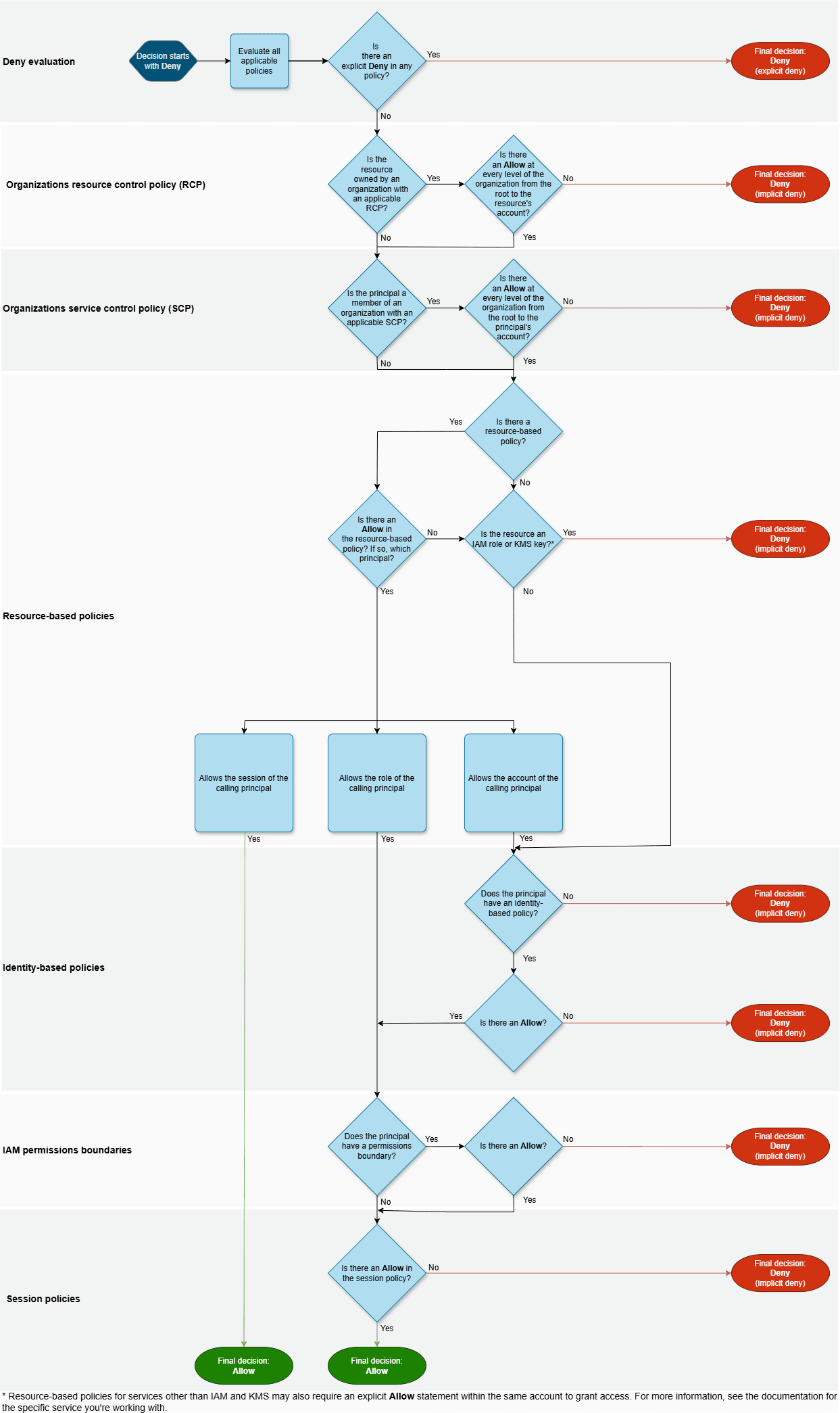
Before getting into each mechanism, it helps to understand where they sit in AWS's permission evaluation logic. AWS publishes the official flowcharts for both IAM users and IAM roles within a single account.
For an IAM role:
For an IAM user:
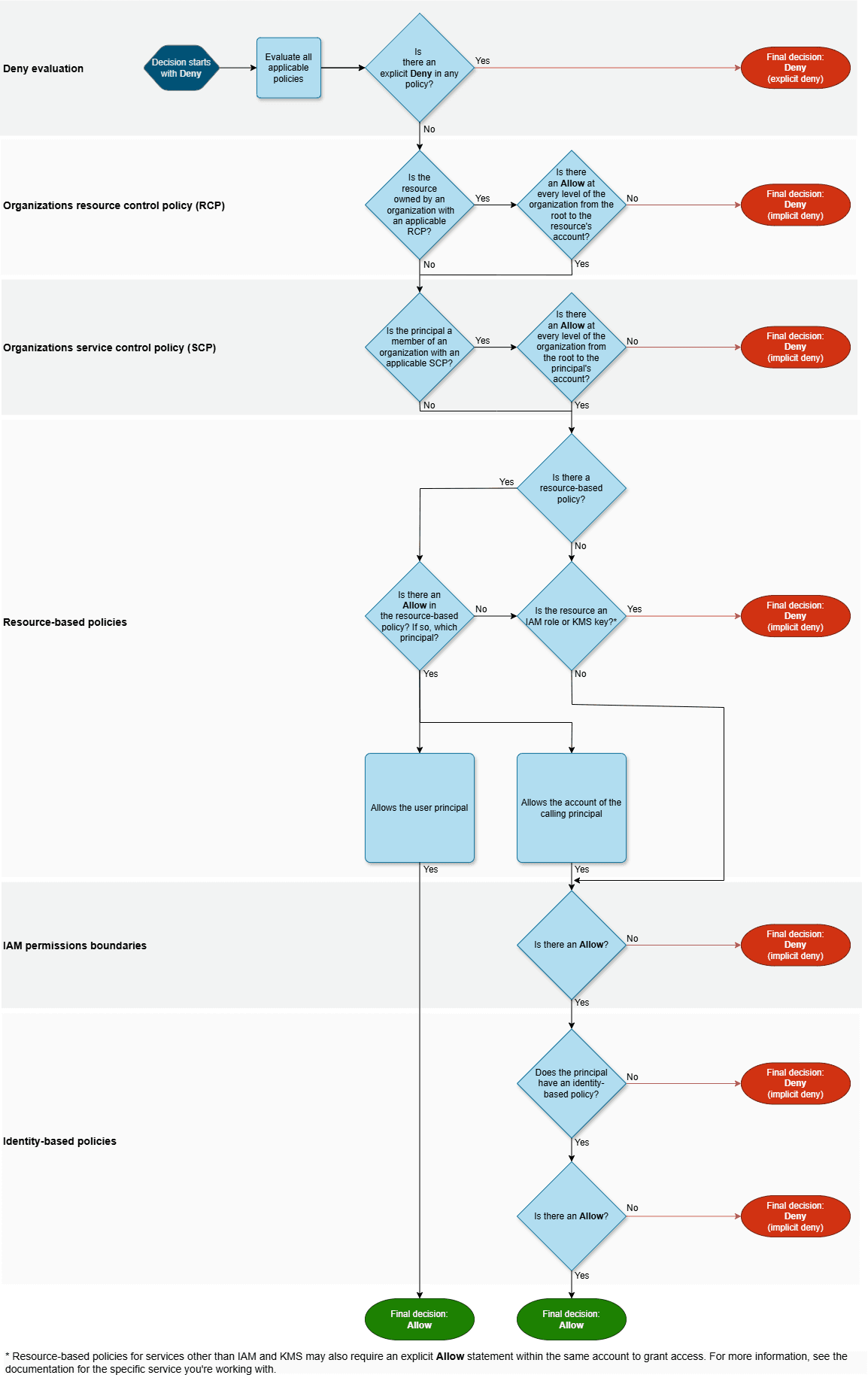
A few things worth noting from these diagrams:
- RCPs are evaluated before SCPs in the official AWS enforcement logic — a detail that matters when debugging unexpected denials.
- Resource-based policies can short-circuit the evaluation for IAM users and role sessions: if a resource-based policy grants access directly to the session principal, an implicit deny in a permission boundary or session policy does not block it.
- Every layer must allow the action for it to succeed. A single denial anywhere in the chain is final.
The guardrails covered in this article — SCPs, RCPs, Permission Boundaries, and Session Policies — each map to a specific decision point in these flowcharts.
Service Control Policies (SCPs)
What they are
SCPs are organization-level policies attached to OUs (Organizational Units) or individual accounts via AWS Organizations. They define the maximum permissions available to identities in those accounts — IAM users, roles, and the root user.
The critical point: SCPs do not grant permissions. They only restrict what identity policies can allow. If an SCP allows s3:* and an IAM role has s3:GetObject, the role can get objects. But if the SCP only allows s3:GetObject, even a role with s3:* can only get objects.
What they protect against
SCPs are your organization-wide guardrail against actions you never want to happen in any account — regardless of what any IAM admin in that account does.
{
  "Version": "2012-10-17",
  "Statement": [
    {
      "Sid": "DenyDeleteVPC",
      "Effect": "Deny",
      "Action": [
        "ec2:DeleteVpc",
        "ec2:DeleteSubnet",
        "ec2:DeleteRouteTable"
      ],
      "Resource": "*"
    }
  ]
}
This SCP, attached to a production OU, ensures no IAM principal in any account under that OU can delete core networking resources — even if they have AdministratorAccess.
What SCPs do not cover
This is where most people get it wrong.
SCPs do not apply to the management account — the root account of the AWS Organization itself is always exempt from SCPs, regardless of what is attached to the root OU. This is a hard AWS limitation and a strong reason to never run workloads in the management account.
SCPs only apply to known IAM identities within the account — IAM users, IAM roles, and the root user of member accounts. They do not apply to AWS service principals (cloudtrail.amazonaws.com, lambda.amazonaws.com, etc.) acting on your behalf, nor to anonymous requests. If an AWS service assumes a role in your account and accesses a resource, the request comes from a service principal — SCPs never evaluate it. This is exactly why SCPs cannot mitigate the confused deputy problem.
More importantly, SCPs only restrict identities, not resources. If you want to prevent an S3 bucket from being made public, an SCP is not the right tool — because the bucket policy is a resource-based policy, and SCPs do not evaluate resource-based policies. That is exactly the gap that RCPs fill.
SCP limits worth knowing
| Limit | Value |
|---|---|
| Maximum size per SCP | 5,120 characters |
| Maximum SCPs per organization | 10,000 |
| Maximum SCPs attached to root | 5 |
| Maximum SCPs attached to an OU | 5 |
| Maximum SCPs attached to an account | 5 |
| Minimum SCPs attached to an entity | 1 (SCPFullAWSAccess is auto-attached and cannot be removed) |
| Maximum OU nesting depth | 5 levels under root |
The 5,120 character limit per policy is the one you will hit first in practice. Whitespace is stripped when saving via the console, so formatting does not count — but complex deny lists with many actions and conditions can fill up quickly. The common workaround is to split logic across multiple SCPs, keeping in mind the 5-per-entity attachment limit.
The FullAWSAccess managed policy is automatically attached to every entity when you enable SCPs. It allows all actions to pass through SCP evaluation by default — meaning your existing permissions are unaffected until you start adding restrictive SCPs. It counts toward the 5-per-entity limit, so in practice you have 4 slots for your own policies per entity.
Resource Control Policies (RCPs)
What they are
RCPs are the newest addition to the guardrail family, introduced in late 2024. They work like SCPs but from the resource side: instead of restricting what identities can do, they restrict what resources can accept — regardless of who is calling.
An RCP is attached to an OU or account via Organizations and applies to supported resource types (S3, SQS, KMS, Secrets Manager, and more). When a principal tries to access a resource, the RCP is evaluated as part of the resource's effective policy.
The gap SCPs cannot fill
Consider this scenario: a developer in your organization creates an S3 bucket and adds a bucket policy that grants public read access. Their IAM role has the permissions to do this. An SCP restricting s3:PutBucketPolicy would help — but only if you remembered to add it, and only for that specific action.
An RCP solves this at a higher level:
{
  "Version": "2012-10-17",
  "Statement": [
    {
      "Sid": "EnforceOrgAccess",
      "Effect": "Deny",
      "Principal": "*",
      "Action": "s3:*",
      "Resource": "*",
      "Condition": {
        "StringNotEqualsIfExists": {
          "aws:PrincipalOrgID": "o-xxxxxxxxxxxx"
        },
        "BoolIfExists": {
          "aws:PrincipalIsAWSService": "false"
        }
      }
    }
  ]
}
This RCP, attached to the organization root, ensures that no S3 bucket in any account can be accessed by a principal outside the organization — regardless of what the bucket policy says. Even if a developer explicitly makes a bucket public, the RCP overrides it.
SCPs vs RCPs — the mental model
Think of it this way:
- SCP: "No identity in this account can perform action X"
- RCP: "No resource in this account can be accessed by principal Y"
They are complementary. An SCP prevents your own identities from doing dangerous things. An RCP prevents your resources from being accessed by unauthorized principals — including external ones that your own identities might accidentally invite in.
RCP limits worth knowing
| Limit | Value |
|---|---|
| Maximum size per RCP | 5,120 characters |
| Maximum RCPs per organization | 1,000 |
| Maximum RCPs attached to root | 5 |
| Maximum RCPs attached to an OU | 5 |
| Maximum RCPs attached to an account | 5 |
| Minimum RCPs attached to an entity | 1 (RCPFullAWSAccess is auto-attached and cannot be removed) |
The RCPFullAWSAccess managed policy is automatically attached to every entity when you enable RCPs. It allows all actions to pass through RCP evaluation by default — meaning your existing permissions are unaffected until you start adding restrictive RCPs. It counts toward the 5-per-entity limit, so in practice you have 4 slots for your own policies per entity.
Permission Boundaries
What they are
Permission Boundaries operate at the individual identity level. A boundary is an IAM managed policy attached to a role or user that defines the maximum permissions that identity can ever have — regardless of what identity policies are attached to it.
If a role has AdministratorAccess but a permission boundary that only allows s3:* and ec2:*, the role can only perform S3 and EC2 actions. The AdministratorAccess policy is effectively capped.
The delegation problem they solve
The primary use case is safe delegation of IAM management. Consider a CI/CD pipeline that needs to create IAM roles for the services it deploys. Without a boundary, you face a dilemma:
- Give the pipeline
iam:CreateRole→ it can create a role withAdministratorAccessand escalate privileges - Refuse to delegate IAM → every role creation becomes a manual bottleneck
Permission Boundaries solve this cleanly. You give the pipeline iam:CreateRole but require it to attach a specific boundary to every role it creates:
{
  "Version": "2012-10-17",
  "Statement": [
    {
      "Effect": "Allow",
      "Action": "iam:CreateRole",
      "Resource": "*",
      "Condition": {
        "StringEquals": {
          "iam:PermissionsBoundary": "arn:aws:iam::123456789012:policy/deployment-boundary"
        }
      }
    }
  ]
}
Now the pipeline can create roles freely, but every role it creates is capped by deployment-boundary. It cannot create a role with more permissions than the boundary allows — privilege escalation through role creation is structurally impossible.
What permission boundaries do not do
Boundaries only apply to the identity they are attached to. They do not propagate to resources that identity accesses, and they do not apply to other identities in the account. They are a per-identity ceiling, not an account-wide guardrail.
Permission Boundary limits worth knowing
| Limit | Value |
|---|---|
| Policy type | Must be a managed policy (AWS or customer managed) — inline policies cannot be used as boundaries |
| Maximum size of the boundary policy | 6,144 characters (same as any customer managed policy) |
| Maximum managed policies per role | 10 (default), up to 25 with quota increase |
| One boundary per identity | Only one boundary policy can be attached to a role or user at a time |
The single-boundary-per-identity constraint is worth keeping in mind: if you need to enforce multiple restrictions, they must all be combined into one managed policy. You cannot stack boundaries the way you can stack SCPs on an OU.
Session Policies
What they are
Session Policies are inline policies passed at the moment of AssumeRole. They restrict the permissions of a specific session without modifying the role itself.
aws sts assume-role \
  --role-arn arn:aws:iam::123456789012:role/my-role \
  --role-session-name my-session \
  --policy '{"Version":"2012-10-17","Statement":[{"Effect":"Allow","Action":"s3:GetObject","Resource":"arn:aws:s3:::my-bucket/*"}]}'
This session can only call s3:GetObject on my-bucket — even if my-role has broad S3 permissions. The session policy intersects with the role's permissions: only actions allowed by both are permitted.
When to use them
Session policies are ideal for just-in-time, scoped access:
- A user assumes a shared role but should only access their own resources during this session
- An automated process needs a role's permissions but only for a specific resource during a specific task
- You want to issue temporary credentials with a reduced blast radius without creating a new role
The key constraint: session policies can only restrict, never expand. You cannot use a session policy to grant permissions the role does not already have.
Session Policy limits worth knowing
| Limit | Value |
|---|---|
| Maximum size (JSON policy + managed policy ARNs combined) | 2,048 characters |
| Maximum managed policy ARNs per session | 10 |
| JSON policy documents per session | 1 |
| Maximum role session duration | 12 hours |
| Maximum role session name length | 64 characters |
The 2,048 character limit is tight. It covers the combined size of the inline JSON policy and any managed policy ARN strings you pass. Complex session policies hit this limit quickly — keep them focused on a single resource or action scope. If you need more, consider creating a dedicated role with the exact permissions needed instead of scoping down a broad role at session time.
How They Interact: A Complete Example
Here is a scenario with all four active simultaneously.
A CI/CD pipeline has a role (pipeline-role) with s3:* on all resources. The account is in an OU with:
- An SCP that denies
s3:DeleteBucket - An RCP that denies S3 access from principals outside the organization
The role has a Permission Boundary that allows only s3:GetObject and s3:PutObject.
At deployment time, the pipeline explicitly calls sts:AssumeRole on pipeline-role and passes a Session Policy that further restricts access to a single bucket, my-bucket. Because the pipeline controls the AssumeRole call, it can inject the session policy itself.
Note: an EC2 instance profile session cannot have a session policy — IMDS calls AssumeRole automatically with no way to inject a policy. Session policies only apply when a principal explicitly calls AssumeRole and passes the policy at that moment.
What can the pipeline session actually do?
| Action | SCP | RCP | Boundary | Role policy | Session policy | Result |
|---|---|---|---|---|---|---|
s3:GetObject on my-bucket | ✅ | ✅ | ✅ | ✅ | ✅ | Allowed |
s3:PutObject on my-bucket | ✅ | ✅ | ✅ | ✅ | ✅ | Allowed |
s3:PutObject on other-bucket | ✅ | ✅ | ✅ | ✅ | ❌ | Denied (session policy) |
s3:DeleteObject on my-bucket | ✅ | ✅ | ❌ | ✅ | ✅ | Denied (boundary) |
s3:DeleteBucket | ❌ | ✅ | ❌ | ✅ | ✅ | Denied (SCP + boundary) |
| Access from external principal | ✅ | ❌ | — | — | — | Denied (RCP) |
Every layer must allow the action. A single denial is enough.
Comparison Table
| SCP | RCP | Permission Boundary | Session Policy | |
|---|---|---|---|---|
| Scope | Account / OU | Account / OU | Individual identity | Individual session |
| Protects | Identities | Resources | Identity | Session |
| Requires Organizations | Yes | Yes | No | No |
| Grants permissions | No | No | No | No |
| Applies to root user | Yes (member accounts only — management account is exempt) | N/A — RCPs restrict resources, not identities | No | No |
| Primary use case | Org-wide action guardrails | Org-wide resource access guardrails | Safe IAM delegation | Just-in-time scoped access |
Closing Thoughts
These four mechanisms are not alternatives — they are complementary layers that operate at different levels of the stack. SCPs and RCPs are organization-wide blunt instruments: they enforce invariants that no individual account admin can override. Permission Boundaries are surgical tools for safe delegation. Session Policies are ephemeral restrictions for scoped, time-limited access.
Used together, they let you build a permission model where the blast radius of any compromise or misconfiguration is structurally bounded — not just by policy review, but by the evaluation engine itself.
The next step after putting guardrails in place is knowing whether they are working. That is where IAM Access Analyzer comes in — and why visibility into who actually has access to what is just as important as the guardrails themselves.
Related reading:
- IAM Cleanup: How I Built an Automated IAM Governance Tool on AWS — automated detection and removal of unused IAM roles and policies.
- 3 AWS Security Misconceptions That Create Blind Spots — why IAM policies are harder to reason about than they appear.
- AWS Organizations SCPs documentation — official reference for Service Control Policies.
- Introducing Resource Control Policies — AWS announcement blog for RCPs.