- Published on
From Transit Gateway to VPC Lattice: A Practical Migration
- Authors

- Name
- Christian TCH
From Transit Gateway to VPC Lattice: A Practical Migration
Most AWS networking architectures follow a familiar pattern: a public Application Load Balancer at the edge, a Transit Gateway stitching VPCs together, and a web of route tables, attachments, and security group rules holding it all in place. It works. But it carries operational weight that compounds over time.
This article walks through a concrete migration I did: taking an infrastructure built around a public ALB and a Transit Gateway, and replacing the cross-VPC database connectivity with Amazon VPC Lattice. The web traffic path stays public — CloudFront in front, ALB behind it — but the Transit Gateway disappears entirely, replaced by a Lattice service network and a Resource Gateway that gives EC2 instances private access to Aurora across VPCs.
The Starting Point: What We Had
The original architecture had two VPCs:
- Egress VPC (
192.168.0.0/16) — public-facing, hosting an Auto Scaling Group of EC2 instances behind a public ALB, a Network Firewall, and a CloudFront distribution. - Data Tier VPC (
172.16.0.0/16) — private, hosting an Aurora MySQL cluster in isolated subnets.
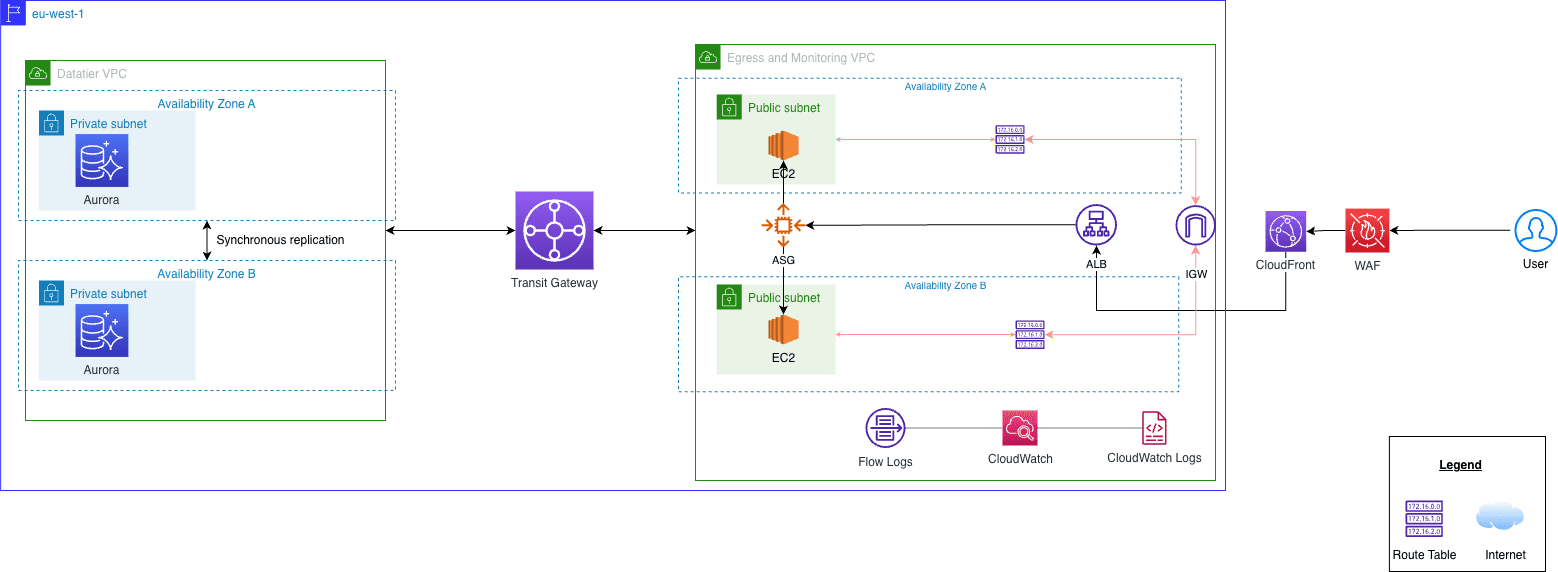
A Transit Gateway connected the two VPCs, with two route tables managing traffic flow: one routing outbound traffic from the data tier toward the egress VPC, and one routing return traffic back.
# The old glue: a Transit Gateway with two route tables
resource "aws_ec2_transit_gateway" "network_gameday" {
  auto_accept_shared_attachments  = "enable"
  default_route_table_association = "disable"
  default_route_table_propagation = "disable"
  description = "Used to interconnect the 2 VPCs of the network gameday"
}

resource "aws_ec2_transit_gateway_route_table" "to_egress_vpc" {
  transit_gateway_id = aws_ec2_transit_gateway.network_gameday.id
}

resource "aws_ec2_transit_gateway_route_table" "from_egress_vpc" {
  transit_gateway_id = aws_ec2_transit_gateway.network_gameday.id
}
The ALB was internet-facing, accepting HTTP on port 80 from 0.0.0.0/0. The EC2 instances accepted traffic from the ALB security group on port 8080. The Aurora cluster accepted MySQL from the EC2 instances in the egress VPC — which meant routing through the Transit Gateway.
It worked. But the surface area was large:
- The Transit Gateway required VPC attachments, route table associations, and route propagation rules — all of which had to stay in sync.
- The data tier's route table pointed its default route at the Transit Gateway, meaning any misconfiguration could expose the database subnet to unintended paths.
- Cross-VPC database connectivity was entirely IP-routing based — no identity layer, no service abstraction, just CIDR routes and security group references across VPCs.
What is Amazon VPC Lattice?
Before getting into the migration, it is worth understanding what VPC Lattice actually is and why it is different from what came before.
VPC Lattice is a managed application networking service that lets you connect, secure, and observe services across VPCs and accounts — without managing the underlying network plumbing yourself. It operates at Layer 4 (TCP) and Layer 7 (HTTP/HTTPS/gRPC), and it introduces a few key abstractions:
Service Network — a logical boundary that groups services and resources together. VPCs are associated to a service network, and anything registered in that network becomes reachable from any associated VPC. No route tables, no peering, no Transit Gateway attachments.
Service — represents an HTTP/HTTPS/gRPC application endpoint (an ALB, an Auto Scaling Group, Lambda functions, or IP addresses). Each service has its own DNS name, listener, and auth policy. Not used in this migration — the ALB stays public-facing via CloudFront.
Resource Gateway + Resource Configuration — extends Lattice to non-HTTP workloads. A Resource Gateway deploys managed ENIs into a VPC and forwards TCP traffic to a backend resource (like an RDS endpoint) using a DNS-based Resource Configuration. This is the core of what we use here.
Auth Policies — IAM-based policies attached to the service network or individual resources. They define which principals can invoke which resources, using standard IAM condition keys.
The key mental shift: with VPC Lattice, you stop thinking about routes between VPCs and start thinking about which workload can reach which resource, and under what conditions.
The New Architecture
The migration kept the same two VPCs and the same application stack. What changed was everything in between.
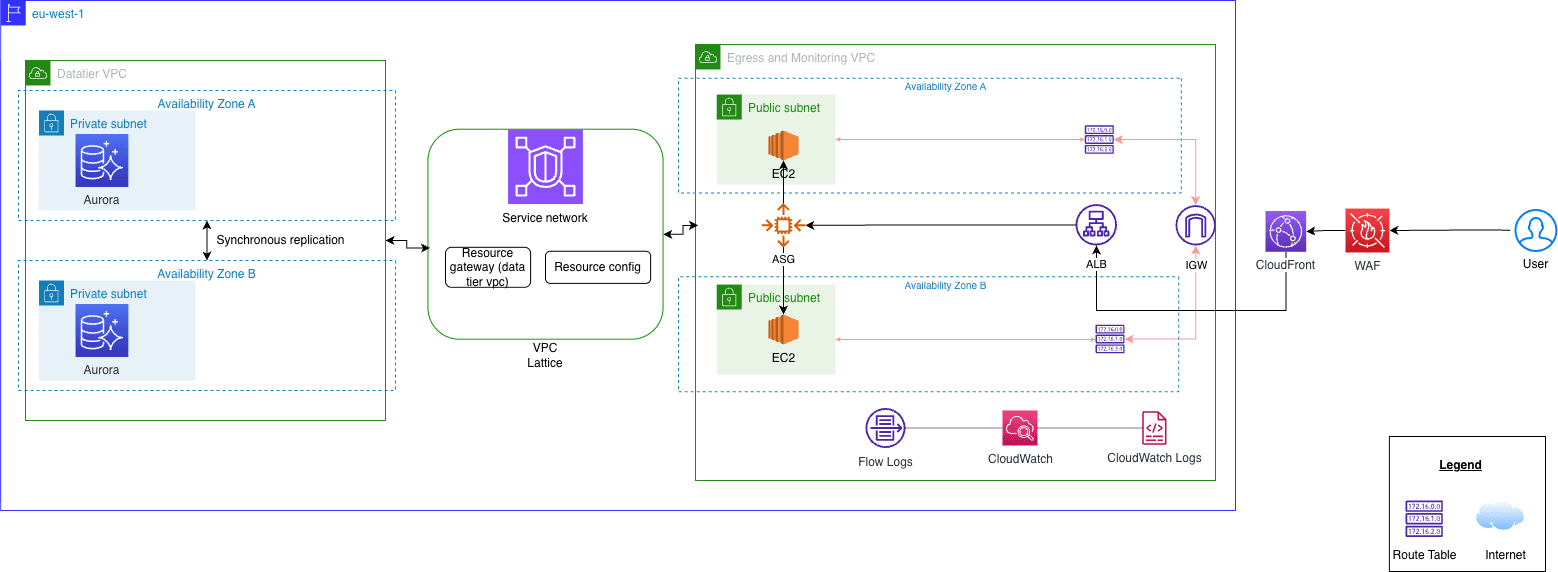
The Service Network
A single service network ties both VPCs together. Both the Egress VPC and the Data Tier VPC are associated to it, each with a dedicated security group controlling what the Lattice-managed ENIs can accept.
resource "aws_vpclattice_service_network" "main" {
  name      = "${local.resource_prefix}-service-network"
  auth_type = "AWS_IAM"
}

resource "aws_vpclattice_service_network_vpc_association" "egress" {
  vpc_identifier             = module.vpc_egress.vpc_egress_id
  service_network_identifier = aws_vpclattice_service_network.main.id
  security_group_ids         = [aws_security_group.lattice_egress.id]
}

resource "aws_vpclattice_service_network_vpc_association" "datatier" {
  vpc_identifier             = aws_vpc.datatier.id
  service_network_identifier = aws_vpclattice_service_network.main.id
  security_group_ids         = [aws_security_group.lattice_datatier.id]
}
No Transit Gateway. No route table entries. No VPC attachments. The association is the connectivity.
The web traffic path is unchanged: CloudFront sits at the public edge, forwards requests to the public ALB in the Egress VPC, and the ALB routes to the EC2 Auto Scaling Group on port 8080. VPC Lattice does not touch this path at all.
What Lattice replaces is the cross-VPC database connectivity — the part that previously required the Transit Gateway.
The Aurora Resource Configuration
The only Lattice resource in this architecture is a TCP resource: the Aurora MySQL cluster in the Data Tier VPC.
A Resource Gateway deploys managed ENIs into the Data Tier VPC subnets. A Resource Configuration maps the Aurora cluster's DNS endpoint to those ENIs on port 3306. The configuration is then associated to the service network, making the database reachable from any associated VPC through Lattice — without any route table changes.
resource "aws_vpclattice_resource_gateway" "db" {
  name               = "${local.resource_prefix}-db-resource-gateway"
  vpc_id             = aws_vpc.datatier.id
  subnet_ids         = [aws_subnet.private_az_a.id, aws_subnet.private_az_b.id]
  security_group_ids = [aws_security_group.resource_gateway.id]
}

resource "aws_vpclattice_resource_configuration" "aurora" {
  name                        = "${local.resource_prefix}-aurora-config"
  resource_gateway_identifier = aws_vpclattice_resource_gateway.db.id
  type                        = "SINGLE"
  port_ranges                 = ["3306"]
  protocol                    = "TCP"

  resource_configuration_definition {
    dns_resource {
      domain_name     = module.application.aurora_endpoint
      ip_address_type = "IPV4"
    }
  }
}

resource "aws_vpclattice_service_network_resource_association" "aurora" {
  service_network_identifier        = aws_vpclattice_service_network.main.id
  resource_configuration_identifier = aws_vpclattice_resource_configuration.aurora.id
}
The Aurora security group no longer accepts traffic from the EC2 instance security group across VPCs. It accepts traffic only from the Resource Gateway security group, which itself only accepts traffic from the Lattice managed prefix list (169.254.171.0/24) on port 3306:
resource "aws_vpc_security_group_ingress_rule" "rg_mysql_in" {
  security_group_id = aws_security_group.resource_gateway.id
  prefix_list_id    = data.aws_ec2_managed_prefix_list.lattice.id
  from_port         = 3306
  to_port           = 3306
  ip_protocol       = "tcp"
}

resource "aws_vpc_security_group_egress_rule" "rg_mysql_out" {
  security_group_id            = aws_security_group.resource_gateway.id
  referenced_security_group_id = module.application.database_security_group_id
  from_port                    = 3306
  to_port                      = 3306
  ip_protocol                  = "tcp"
}
The traffic path is now: EC2 instance → Lattice managed ENI → Resource Gateway ENI → Aurora. Every hop is controlled and auditable.
How the EC2 Instances Access the Database
In the original architecture, the EC2 instances connected to Aurora directly over the Transit Gateway — the instance security group was referenced in the Aurora security group ingress rule, and routing was handled by the TGW route tables. Simple, but it meant the data tier VPC had to maintain a full default route pointing at the Transit Gateway.
With VPC Lattice, the instances connect to Aurora through the Lattice-assigned DNS name for the Resource Configuration. Lattice resolves that DNS name to a link-local address (169.254.171.x), routes the TCP connection through the Resource Gateway ENIs in the data tier VPC, and forwards it to the Aurora endpoint.
The instance user data passes the Aurora endpoint as an environment variable, exactly as before:
export GAMEDAY_DB_ENDPOINT=${gamedaydb_endpoint}
export GAMEDAY_DB_PORT=${gamedaydb_port}
export GAMEDAY_SECRET_ARN=${gamedaydb_secret_arn}
The Flask application retrieves credentials from Secrets Manager and opens a pymysql connection to that endpoint. From the application's perspective, nothing changed — it still connects to a hostname on port 3306. The difference is entirely in the network path: instead of a routed IP path through the Transit Gateway, the connection goes through the Lattice data plane.
The EC2 instances sit in the public subnets of the Egress VPC (they need internet access for package installation and CloudWatch). The Lattice VPC association on the Egress VPC injects managed ENIs into those subnets, so the instances can reach the Aurora Resource Configuration without any additional routing configuration — and without the data tier VPC needing a default route anywhere.
What Actually Changed
Here is a direct comparison of the two architectures:
| Concern | Before (TGW + Public ALB) | After (VPC Lattice) |
|---|---|---|
| Public entry point | CloudFront → public ALB | CloudFront → public ALB (unchanged) |
| VPC connectivity | Transit Gateway + attachments + route tables | Service network VPC associations |
| DB access path | TGW route → EC2 SG → Aurora SG | Lattice Resource Gateway → Aurora SG |
| Cross-VPC routing | Explicit CIDR routes in both VPCs | None — Lattice handles it |
| Data tier route table | Default route → Transit Gateway | No cross-VPC routes at all |
| DB access control | Security group reference across VPCs | Resource Gateway SG + Lattice prefix list |
| Observability | VPC Flow Logs | VPC Flow Logs + Lattice access logs |
The Transit Gateway and its two route tables, two route table associations, two route entries, and two VPC attachments are gone. The data tier VPC route table no longer has a default route pointing at the Transit Gateway — it has no cross-VPC routes at all.
The Security Model Shift
The most important change is not operational — it is conceptual.
With the Transit Gateway model, the EC2-to-Aurora path was secured purely by security group references across VPCs. The instance SG was allowed into the Aurora SG on port 3306, and routing was handled by CIDR-based TGW route tables. There was no concept of "this workload is authorized to reach this resource" — only "this IP range can reach this port."
With VPC Lattice, the Resource Gateway introduces a controlled chokepoint. The Aurora SG no longer references the instance SG directly — it only accepts traffic from the Resource Gateway SG, which itself only accepts traffic from the Lattice managed prefix list. The path is:
EC2 instance → Lattice ENI (169.254.171.x) → Resource Gateway ENI → Aurora
If you add an auth policy to the resource configuration or service network, you can go further and restrict which IAM principals can reach the database resource at all — for example, only EC2 instances with a specific instance profile role. That is a fundamentally different security model from a security group rule: it is identity-based, not network-based.
What VPC Lattice Does Not Replace
A few honest notes on scope:
- It does not replace a Transit Gateway for all use cases. If you need full IP-level routing between VPCs (e.g., for legacy protocols, ICMP, or non-HTTP/TCP workloads that do not fit the Resource Configuration model), a Transit Gateway is still the right tool.
- The Resource Gateway is relatively new. TCP resource support via Resource Gateway was added in late 2024. Not all Terraform provider versions support it yet — check that you are on
hashicorp/aws>= 5.44. - Auth policies require sigv4 signing on the client side. If your application makes calls to Lattice services, those calls need to be signed with AWS credentials. This is straightforward for AWS SDKs but requires explicit handling for custom HTTP clients.
Cost Comparison
This is worth thinking through carefully before migrating, because the two models bill very differently.
Transit Gateway
Transit Gateway charges on two dimensions:
- Attachment fee — $0.05 per VPC attachment per hour (~$36.50/month per attachment). In this architecture that is two attachments (Egress VPC + Data Tier VPC), so ~$73/month just for the connectivity.
- Data processing — $0.02 per GB sent through the gateway. Every MySQL query and response between EC2 and Aurora is metered here.
For a two-VPC setup with moderate database traffic (say 100 GB/month), you are looking at roughly $75/month baseline plus $2 in data processing.
VPC Lattice — Resource Configuration
Lattice has two distinct pricing tiers depending on what you are connecting to.
Services tier (ALB, ASG, Lambda, IP targets — HTTP/HTTPS/gRPC):
- $0.025/hour per service (~$18.25/month)
- $0.025/GB data processed
- $0.10 per hour per 1M HTTP requests (first 300k/hour free)
VPC Resources tier (TCP backends like RDS, ElastiCache, or any non-HTTP endpoint — accessed via Resource Gateway + Resource Configuration):
- $0.10/hour per Resource Configuration (~$72/month)
- Tiered data processing: $0.01/GB for the first PB, dropping to $0.006/GB and $0.004/GB at higher volumes
In this architecture we only use the VPC Resources tier, because Aurora is a TCP endpoint that cannot be a native Lattice service — it needs the Resource Gateway path. If you were also wrapping the ALB as a Lattice service, that would fall under the cheaper Services tier at $0.025/hour instead.
The $0.10/hour Resource Configuration charge is higher than a single TGW attachment ($0.05/hour), but the data processing rate is lower — $0.01/GB vs the TGW's flat $0.02/GB. For this two-VPC setup with moderate database traffic (say 100 GB/month), the monthly cost is roughly comparable: ~$73 for two TGW attachments + $2 data processing vs ~$72 for the Resource Configuration + $1 data processing.
Where Lattice becomes clearly cheaper is at scale. Each additional VPC association to a Lattice service network is free, whereas each additional TGW attachment costs another $36.50/month. At three or more VPCs the math shifts decisively in Lattice's favour.
As always, use the AWS Pricing Calculator to model your specific traffic patterns before committing.
The Result
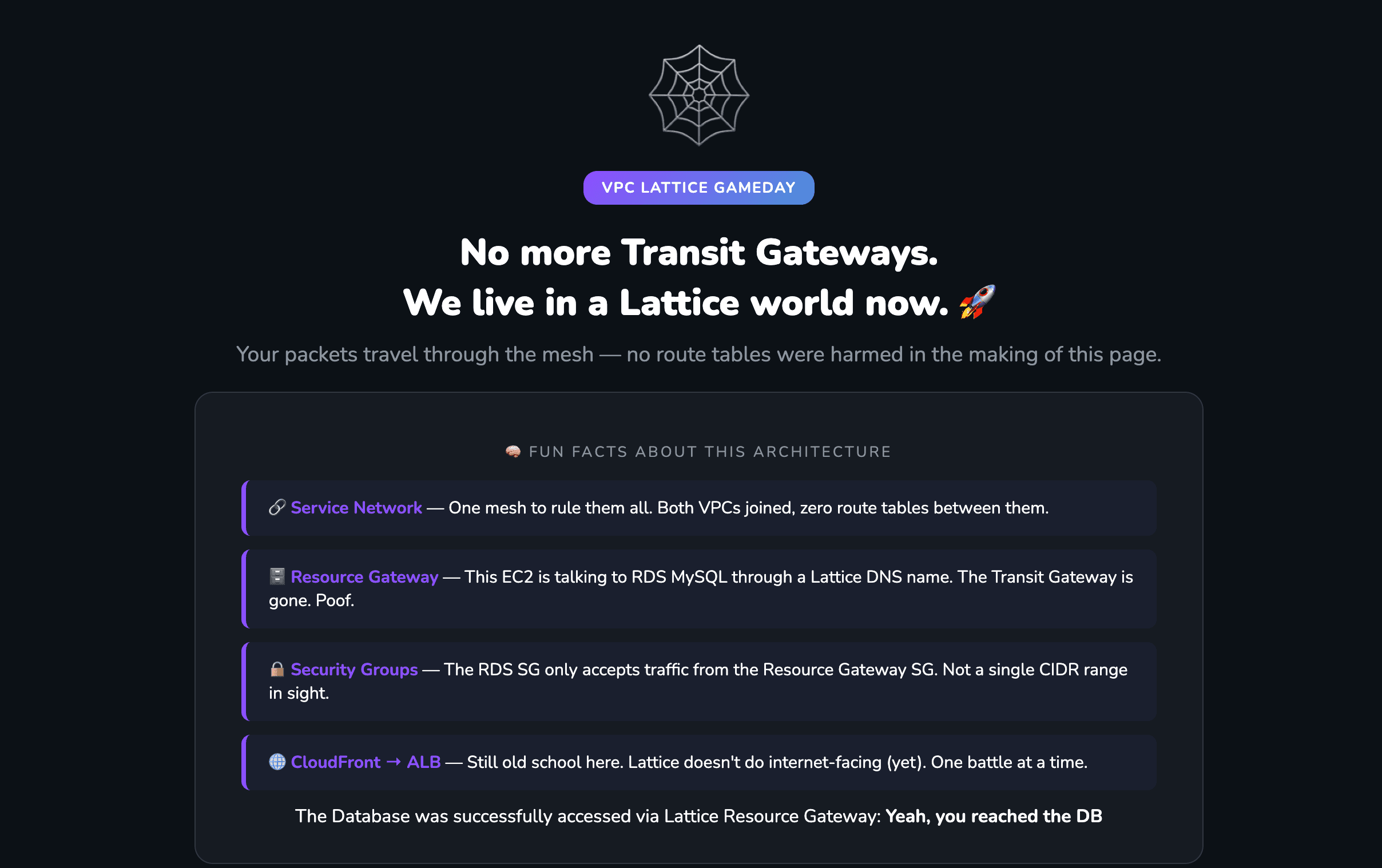
The screenshot above is the application frontend, served through CloudFront and the public ALB, with the EC2 instances reading from Aurora over the Lattice Resource Gateway in the background.
Closing Thoughts
VPC Lattice does not make networking simpler by hiding complexity — it makes it simpler by eliminating the complexity that was never necessary in the first place. Route tables that exist only to connect two VPCs, Transit Gateway attachments that exist only to forward database traffic, security group references that span VPC boundaries — all of that goes away.
What remains is a clear, auditable model: a service network, the VPCs associated to it, and a Resource Gateway that gives workloads controlled access to private resources across VPC boundaries. The public traffic path stays exactly as it was — CloudFront, ALB, EC2 — and VPC Lattice handles the one thing that actually needed to change.
The full Terraform code for both the original architecture and the VPC Lattice migration is available on GitHub.
Related reading:
- 3 AWS Security Misconceptions That Create Blind Spots — why perimeter-based security models create blind spots, and why identity-based controls matter.
- Amazon VPC Lattice documentation — official AWS documentation for VPC Lattice concepts and API reference.