- Published on
From Static Passwords to Dynamic Access: Vault + HCP Boundary on Kubernetes
- Authors

- Name
- Christian TCH
From Static Passwords to Dynamic Access: Vault + HCP Boundary on Kubernetes
In my previous article, I validated the core zero-trust flow with HCP Boundary on Kubernetes: no direct exposure of MySQL or SSH, access routed through an in-cluster worker, and credentials handled by Boundary.
Part 1: Zero-Trust Database and SSH Access with HCP Boundary on Kubernetes — A Hands-On POC
This post is the natural next step.
Ephemeral access by design: Vault issues credentials only when a session is authorized, and those credentials expire quickly instead of becoming long-lived secrets.
I replaced static credentials with HashiCorp Vault so credentials are generated (or signed) just in time for each Boundary session:
- MySQL access now uses Vault's database secrets engine to create ephemeral usernames/passwords
- SSH access now uses Vault's SSH CA engine to sign short-lived user certificates
All configuration comes from the sibling repository folder ../Boundary, mainly:
../Boundary/terraform/boundary-config/vault.tf../Boundary/terraform/boundary-config/targets.tf../Boundary/k8s/vault/../Boundary/k8s/ssh-target/vault-ca-configmap.yaml
What Changed Since the Previous Article
Previously:
- SSH used a static username/password stored in Boundary
- MySQL used a static username/password stored in Boundary
Now:
- Boundary reads credentials from Vault credential libraries
- MySQL credentials are created per session and revoked when expired
- SSH certificates are signed with a short TTL (
5m) and trusted by the target SSH daemon viaTrustedUserCAKeys
This is the shift from stored secret distribution to ephemeral identity-based access.
Updated Architecture
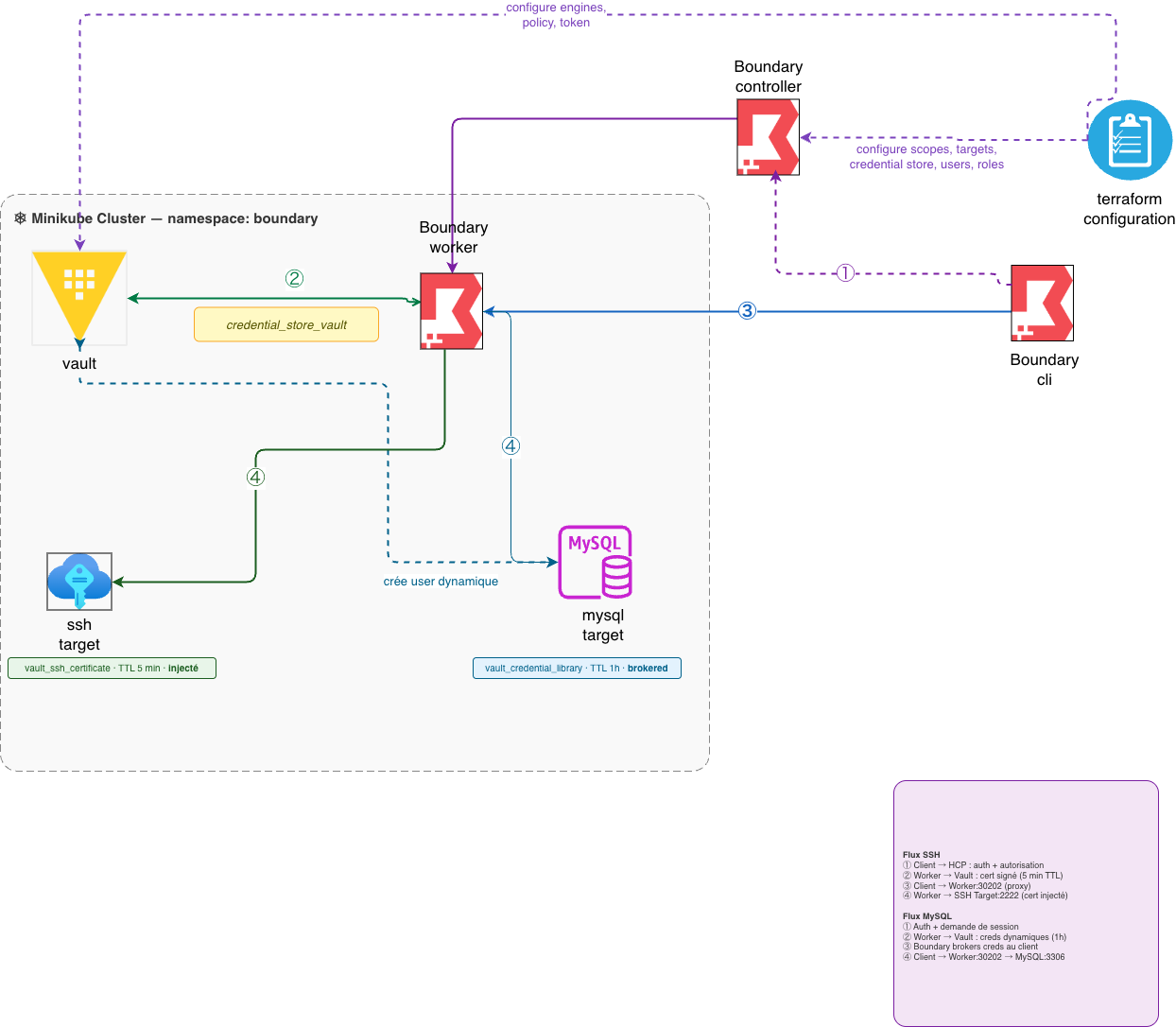
The diagram shows the end-to-end flow:
- SSH flow — Client → HCP authorization → Boundary worker calls Vault to sign a short-lived certificate (
5mTTL) → certificate injected into session - Vault credential library — Worker holds a Vault token and calls credential engines through the worker filter
- Boundary client authorization — CLI or Desktop authenticates, receives session approval from HCP controller
- MySQL flow — Worker proxies to MySQL target with dynamically-generated credentials (1h default TTL, revoked on expiration)
Key point: the HCP controller does not need direct network reachability to Vault or targets. The Boundary worker handles data-plane traffic and Vault API calls through:
worker_filter = "\"k8s\" in \"/tags/type\""
Kubernetes: Add Vault and Trust the SSH CA
Vault runs in-cluster (dev mode for this lab) and is exposed via NodePort only so Terraform on the host can configure it.
../Boundary/k8s/vault/deployment.yaml:
containers:
  - name: vault
    image: hashicorp/vault:1.17
    args:
      - "server"
      - "-dev"
      - "-dev-listen-address=0.0.0.0:8200"
../Boundary/k8s/vault/service.yaml:
spec:
  type: NodePort
  ports:
    - port: 8200
      targetPort: 8200
      nodePort: 30200
For SSH certificate trust, the SSH target uses a ConfigMap mounted as trusted user CA keys:
../Boundary/k8s/ssh-target/Dockerfile includes:
echo "TrustedUserCAKeys /etc/ssh/trusted-user-ca-keys.pem" >> /etc/ssh/sshd_config
../Boundary/k8s/ssh-target/vault-ca-configmap.yaml is updated after Terraform creates the Vault SSH CA public key.
Terraform: Configure Vault Engines and Boundary Integration
1. Configure Vault engines and roles
In ../Boundary/terraform/boundary-config/vault.tf:
- Enable
database/mount and register MySQL connection - Create role
boundary-mysqlwith creation/revocation SQL - Enable
ssh/mount and generate SSH CA - Create role
boundary-sshforboundary-userwithttl = "5m" - Create minimal policy for Boundary to read/sign credentials
- Create renewable orphan token for Boundary
MySQL dynamic role (excerpt):
resource "vault_database_secret_backend_role" "mysql" {
  backend = vault_mount.db.path
  name    = "boundary-mysql"

  creation_statements = [
    "CREATE USER '{{name}}'@'%' IDENTIFIED BY '{{password}}';",
    "GRANT ALL PRIVILEGES ON demo.* TO '{{name}}'@'%';",
  ]
  revocation_statements = ["DROP USER IF EXISTS '{{name}}'@'%';"]

  default_ttl = 3600
  max_ttl     = 7200
}
SSH CA role (excerpt):
resource "vault_ssh_secret_backend_role" "boundary" {
  backend                 = vault_mount.ssh.path
  name                    = "boundary-ssh"
  key_type                = "ca"
  allow_user_certificates = true
  allowed_users           = "boundary-user"
  default_user            = "boundary-user"
  ttl                     = "5m"
}
2. Register Vault as a Boundary credential store
In ../Boundary/terraform/boundary-config/targets.tf:
resource "boundary_credential_store_vault" "main" {
  name          = "vault"
  scope_id      = boundary_scope.project.id
  address       = "http://vault.boundary.svc.cluster.local:8200"
  token         = vault_token.boundary.client_token
  worker_filter = "\"k8s\" in \"/tags/type\""
}
3. Create Vault-backed credential libraries
SSH signed cert library:
resource "boundary_credential_library_vault_ssh_certificate" "ssh" {
  name                = "ssh-signed-cert"
  credential_store_id = boundary_credential_store_vault.main.id
  path                = "ssh/sign/boundary-ssh"
  username            = "boundary-user"
  ttl                 = "5m"
}
MySQL dynamic credentials library:
resource "boundary_credential_library_vault" "mysql" {
  name                = "mysql-dynamic"
  credential_store_id = boundary_credential_store_vault.main.id
  path                = "database/creds/boundary-mysql"
  http_method         = "GET"
  credential_type     = "username_password"
}
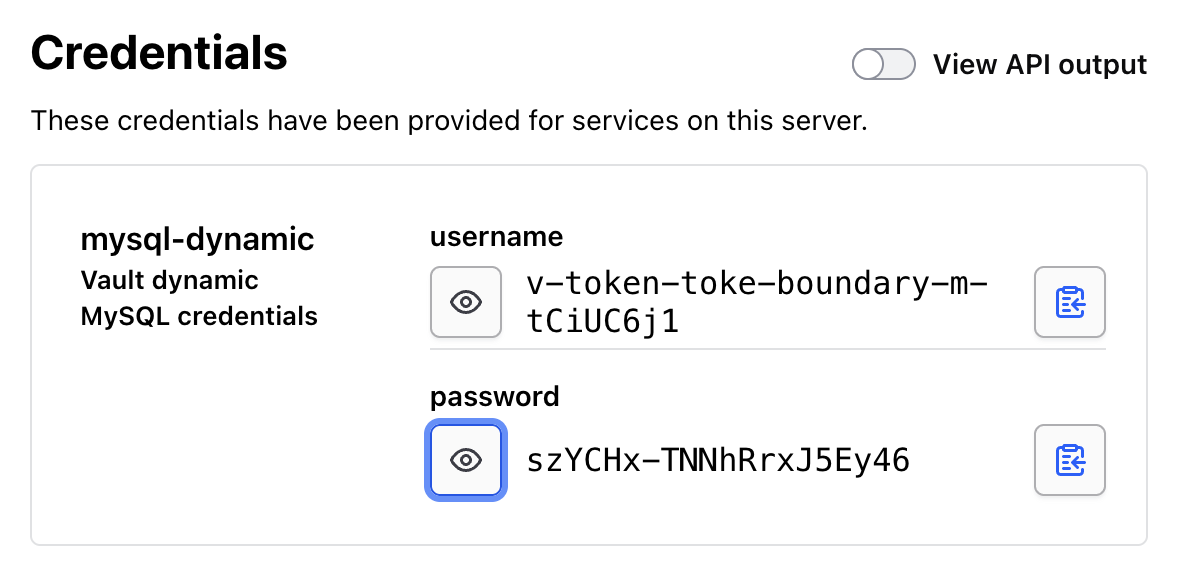
This is where dynamic database credentials are issued on demand for Boundary sessions:
4. Attach libraries to targets
- SSH target uses:
injected_application_credential_source_ids
- MySQL target uses:
brokered_credential_source_ids
This preserves the same user experience as the previous article while replacing static creds with dynamic Vault-backed flows.
End-to-End Deployment Flow
From ../Boundary:
kubectl apply -f k8s/namespace.yaml
kubectl apply -f k8s/worker/
kubectl apply -f k8s/vault/
kubectl apply -f k8s/ssh-target/
kubectl apply -f k8s/mysql/
Then apply Terraform from ../Boundary/terraform/boundary-config:
cp terraform.tfvars.example terraform.tfvars
terraform init
terraform apply
After apply, inject the generated Vault SSH CA public key into the SSH ConfigMap:
kubectl create configmap ssh-vault-ca -n boundary \
  --from-literal=trusted-user-ca-keys.pem="$(terraform output -raw vault_ssh_ca_public_key)" \
  --dry-run=client -o yaml | kubectl apply -f -

kubectl rollout restart deployment/ssh-target -n boundary
This is mandatory: without the CA public key trusted by sshd, Vault-signed user certs will be rejected.
Session Usage
Authenticate to Boundary:
boundary authenticate \
  -addr=<BOUNDARY_CLUSTER_URL> \
  -auth-method-id=<AUTH_METHOD_ID>
SSH via injected short-lived certificate:
boundary connect ssh -target-id=$(terraform output -raw ssh_target_id)
MySQL via brokered dynamic credentials:
boundary connect \
  -target-id=$(terraform output -raw mysql_target_id) \
  -exec mysql -- \
    -u {{boundary.username}} \
    -p{{boundary.password}} \
    -h {{boundary.ip}} \
    -P {{boundary.port}} \
    demo
Behind the scenes, each session pulls fresh credentials from Vault instead of reusing a long-lived shared secret.
Why This Matters
Moving from static credentials to Vault-backed dynamic credentials gives immediate security benefits:
- Reduced blast radius: leaked credentials expire quickly
- No shared DB users: every session can map to unique ephemeral principals
- Better revocation semantics: Vault revokes generated users/certs automatically
- Cleaner separation of duties: Boundary brokers access, Vault manages secret issuance
This pattern is much closer to production-grade privileged access than static password storage.
Operational Notes and Caveats
- The Vault deployment in this lab is dev mode for simplicity. Production requires HA storage, proper unseal strategy, TLS, and hardened auth/token strategy.
- The MySQL container uses
mysql_native_passwordspecifically for compatibility with Vault's Go MySQL driver in this setup. - The Boundary token created in Vault is renewable and long-lived (
period = "768h"). In production, scope and rotate this aggressively and consider auth methods that avoid static token handling. - If SSH cert login fails, verify the ConfigMap update and check that
TrustedUserCAKeyspoints to the mounted file.
Closing
The first article proved Boundary could broker access without exposing services. This sequel proves the stronger model: ephemeral credentials per session powered by Vault.
Same topology, better security posture.
The next logical step is to move from lab-grade Vault auth/token patterns to production-grade trust (Kubernetes auth, policy segmentation, token lifecycle hardening) and add full session recording where required.